"The utility is excellent, was easy to use and worked very well. Thank you."
"Outlook Freeware is excellent - it did exactly what it promised to do!"
"I used it and it was very helpfull. Thank you!"
|
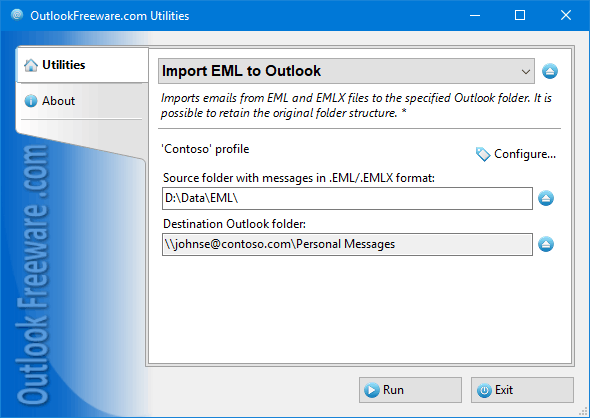
Import EML to Outlook
|
|
You can download a free limited version down below
|
Main features
- Imports EML files into Outlook and Exchange Server folders and mailboxes.
- Supports all major Outlook account types: Office 365, IMAP (Gmail), POP3, Exchange, Outlook.com.
- Supports PST data files and Exchange Public Folders.
- Retains the original folder structure, message headers, formatting, attachments.
- Decodes Winmail.dat and other TNEF attachments.
- Imports EML files into Outlook in bulk or on schedule from the command line.
Key benefits of the flexible utility settings:
- The utility saves all data from EML message files. In particular, it saves dates, recipient and sender addresses, subjects, Internet headers, attachments, message texts with HTML markup and pictures, etc.
- Our utility does not simply import emails - it does it right, unlike many other programs. When migrating, all mail headers are saved, including "Blind Carbon Copy" (BCC).
- The utility allows you to create an existing folder structure with EML files in Outlook. This enables you to quickly and painlessly move all mail from another email client or backup copy without losing data and folder structure.
- Additional filters allow you to move emails selectively. For example, you can only select messages with or without attachments and limit the size of the source EML files.
- Successfully imported EML files can be automatically moved to another folder on the disk, which prevents duplicate messages from being generated when you run the utility again on the same source folder.
Are there any restrictions on importing data from EML files to Outlook?
The advanved version of utility for importing EML files to Outlook doesn't impose any limitations when migrating messages. Specifically:
- There are no limits on the number and size of the source EML files. All possible limits are only set by Outlook.
- You can import any number of files and folders as many times as you like.
- The tool supports the EML and EMLX formats of all existing email clients and systems.
How to import EML files periodically into Outlook on a scheduled basis?
The command line app included in the advanced version of the product and Windows Task Scheduler are used to periodically import email messages from EML to Outlook on schedule. You just need to set up a schedule for launching the utility automatically, using familiar built-in Windows tools. As a benefit, you don't need to manually log in to the user account to import EML into Outlook by schedule. This way makes it possible to use the utility in a variety of scenarios for automatically restoring or copying mail of many users from EML files.
How to import EML to Outlook from the command line?
The advanced version of the program provides the ability of mass-importing messages from EML to Outlook using scripts, batch files, Task Scheduler, PowerShell, and other automation tools. For that, use the command line app that is part of the product. A command line will help you to implement complex email migration scenarios. The automatic processing of multiple mailboxes and Office 365/Exchange Server Public Folders will be much faster when running multiple command line apps simultaneously. At the same time, a standalone launcher app imports EML/EMLX files into Outlook/Office365/Exchange without having to start Outlook.
Importing messages from EML files is often the only way to transfer mail from other email systems to Outlook. By moving all your mail to Outlook, you'll be more productive and avoid unnecessary errors. Use the command line app to import EML/EMLX files into users' mailboxes as a simple and reliable way for email migration of any scale.
 | Alexander Bashirian
“Utilized the eml importer. Excellent software thanks!” |
 | Matthew Schuster
“Just needed it to import EML files, worked great!” |
 | Daniel Blick
“Program worked perfectly! I have searched for weeks to find a free application to import .eml files into Outlook. Thank you very much!” |
 | Mia Waelchi
“Used to import my old .eml files - worked a treat thank you.” |
![OutlookFreeware.com Outlook Ribbon]()
|
|
All utilities easily integrate with Outlook (optionally)
|
* This utility is for non-commercial home use only. It will not run in domain enviroment. Some of the described features and support for domain enviroment are available in advanced version of the utility only. Free version may have additional limitations.
|
Ask any questions on our forum
We are always happy to help you with our utilities and answer any related questions.
|
|
How to Import EML Files into Outlook?
This step by step tutorial shows how to import email messages from EML and EMLX files into selected Outlook folder.
|
|
Related blog posts:
|
|
Related utilities:
|
|
|
|
Download advanced version of "Import EML to Outlook"
|
|
Download free limited version of "Import EML to Outlook"
Version 5.0, released on September 16, 2024
System Requirements:
Microsoft Office Outlook 365, Outlook 2021, Outlook 2019, Outlook 2016, Outlook 2013, Outlook 2010, Outlook 2007.
Microsoft Windows 11, Windows 10, Windows 8/8.1, Windows 7, Windows Vista, Windows XP SP3.
OutlookFreeware Utility Manager is required to install and run this utility.
|
|
Mail Merge with Individual Attachments
This article shows how to quickly bulk-mail from Outlook to a list of recipients with different attachments.
Delete Duplicate Emails in Outlook
Microsoft Outlook is a popular organizer and a handy email application with many additional functions. But Outlook users are not immune to operational problems. One such problem is the repeated emails in the Outlook mailbox that occur due to errors or various failures.
Transfer Outlook Folders to a New Computer
Microsoft Outlook allows you to move information to another desktop by using PST data files, or by synchronizing the account with an email server. But what if you only need to move certain Outlook folders to a new computer?
Move Emails Between Folders in Outlook
You can create Outlook rules to automatically allocate emails to new folders. But to relocate messages and change the folder structure, Outlook does not offer automated tools. Let's see how you can move or copy emails manually and in an alternative manner.
18 Reasons Why Outlook Duplicates Emails, Contacts, Tasks, and Calendar Entries
Duplicate Outlook items can occur for a variety of reasons. Unnecessary copies of emails, appointments and meetings, contacts, tasks, notes, and journal entries can appear unexpectedly and interfere with your work. In this article, we have collected the most common causes of Outlook duplicates and suggested ways to deal with them.
More in blog...
![110 Power Add-Ins for Outlook]()
|