"Worked well enough, many thanks, converting eml files to pst."
"Excellent utility - worked really well and with no fuss."
"Dude, Awesome utility! Did what I needed it to do."
|
How to Save Attachments from MSG Files?
This step-by-step guide shows how to extract attachments from Outlook MSG files on your disk drive or network resource.
To complete this tutorial, you need:
Then just follow a few easy steps.
Install the Save Attachments from MSG utility and launch the OutlookFreeeware.com Utilities from Windows Desktop or Start Menu. Specify the folder with .MSG files on your disk or network share:
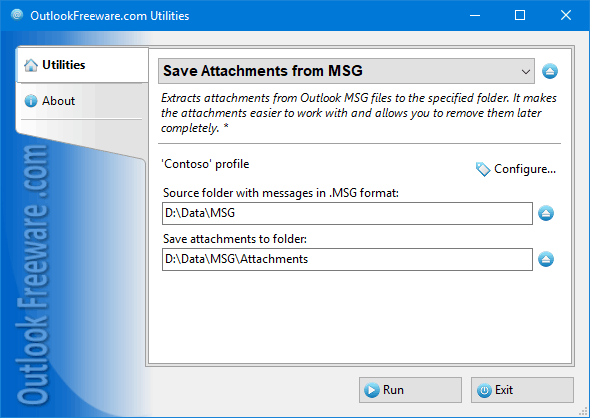 Specify the folder on your disk or network share for extracted attachments. Run the tool and wait until it finishes. In the end, you can see the number of .MSG files processed and the number of saved attachments:
![Results of the 'Save Attachments from MSG' utility]()
See also:
Please note that 180 free utilities and add-ins for Outlook available on our website. They are all created for the needs of our users. Using these utilities, you can speed up Outlook, improve your productivity and solve many problems.
|
|